How Can I Trace My TUT Student Number? The Tshwane University of Technology (TUT) offers an official Learning Management System (LMS) named myTUTor, which serves as a gateway to online interactions, examinations, and educational resources.
This platform is used for both instructor and peer interactions, as well as accessing exams. It acts as a central portal for all online educational content, with academic departments responsible for creating and updating the materials.
How Can I Trace My TUT Student Number?
[su_panel color=”#000000″ border=”4px solid #3ead22″ radius=”8″]
You can visit the website www.ienabler.tut.ac.za. To check your application status and student number, input your ID number. Alternatively, if you don’t possess an ID Number, you can provide your Full Name. After entering the necessary information, click the “Submit” button.
[/su_panel]
TUT myTuTor: The Online eLearning Resource
TUT myTuTor is an online eLearning resource designed for students at the Tshwane University of Technology. This article aims to provide comprehensive information about TUT and its various aspects.
Accessing and Changing myTUTor Password
[su_panel color=”#000000″ border=”4px solid #050b8f” radius=”8″]
- Use your student ID as your username.
- Your TUT4life email password is the same as your myTUTor password.
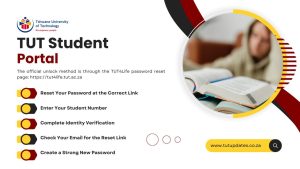
- To reset or create a new password, visit the provided link.
- Provide your identity number and current student number (ID).
- Choose a new password following the Password Rules and enter it twice.
- Log in using the new password by revisiting the myTUTor homepage and following steps 1-2.
- Use Mozilla Firefox or Google Chrome for browsing myTUTor.
- It may take 24 to 48 hours for profiles and subjects to sync after registration.
- Contact myTUTor support if login or subject visibility issues persist beyond 48 hours.
[/su_panel]
Tshwane University of Technology Student Portal – TUT ITS
The Tshwane University of Technology’s student portal, TUT ITS, is a hub for essential information such as timetables, test results, and student support for current students. The portal also offers quick links to the library, myTUTor, student email, and the online registration system.
TUT Email Accounts and Passwords
Students can set up TUT email accounts and reset passwords at https://tut4life.tut.ac.za.
Logging into TUT ITS
[su_panel color=”#000000″ border=”4px solid #f10e09″ radius=”8″]
- Access the TUT ITS enabler login page at the provided URL.
- Enter your student ID.
- Enter your PIN.
- Click the Login button to access your TUT login portal.
[/su_panel]
Troubleshooting Portal Access Issues
If you encounter difficulties accessing your portal
[su_panel color=”#000000″ border=”4px solid #f109e0″ radius=”8″]
- Check your Caps Lock status depending on your password and the site.
- Ensure a working internet connection and device connectivity.
- Use a VPN only if necessary.
[/su_panel]
TUT ITS Uses
TUT ITS provides 24/7 on-demand access to various resources, including
[su_panel color=”#000000″ border=”4px solid #741cba” radius=”8″]
- Checking semester results.
- Viewing admission status and printing admission letters.
- Course registration.
- Fees payment.
- Acceptance fee payment.
- Obtaining transcripts.
- Monitoring the academic schedule.
- Accumulating credit hours.
[/su_panel]
Checking TUT Status in 2024
To check your application status
[su_panel color=”#000000″ border=”4px solid #05d9ff” radius=”8″]
- Visit www.ienabler.tut.ac.za.
- Enter your ID number or surname, date of birth, and full name.
- Press “Submit” to view your application status and student number.
[/su_panel]
Importance of the TUT Student Portal
[su_panel color=”#000000″ border=”4px solid #eae506″ radius=”8″]
The Tshwane University of Technology’s student portal offers a dynamic learning environment, acting as a central hub for apps, data, and materials. It serves as a gateway for students to access programs, course content, articles, lectures, videos, and more.
This portal also provides information about the university, events, calendars, resources, and contact details. It can be integrated with other platforms for quick access to personal data like bursary awards and medical insurance.
[/su_panel]














 TUT1 year ago